Before Each Session
Choose a lesson
Look through the Topics to decide which lesson you would like to teach. The Lesson Plan lists everything you will need. Make sure you have enough copies of the relevant activity sheets based on the levels of the children attending the session. If possible, provide each child with a named work tray and folder.
Check who is coming
Hopefully, you will have already gathered information about the children who may attend. I ask parents to complete an enrolment form, in addition to the general consent form provided for all the young people in our church. This includes information that helps us determine which activity level would be the best fit for each child. See the Activity Levels section for a detailed description of all four levels.
To know exactly who is coming to a particular session, I have a WhatsApp group for parents and send out a poll two days before we meet. Parents simply respond by ticking Yes or No so that I can see who will be attending. I also encourage them to contact me personally if there are any issues we need to be aware of.
I also have a WhatsApp group for leaders so that I can let them know who will be attending and how I have arranged the 1:1 support allocation.
Setting Up
🤓 Preparing the Technology
The lesson plan includes all the teaching information, plus links to story videos and songs that can be downloaded and shown on a TV via a USB stick or embedded into a PowerPoint presentation.
For copyright reasons, I can't share the downloaded videos, but you can download them using software such as 4K Video Downloader Plus. The downloaded videos can then be inserted into the PowerPoint slides once the presentation has been saved to your laptop or computer.
If there is no access to a TV and numbers are small, an iPad or laptop will usually be adequate, provided there is a good Wi-Fi signal.
📺 Using a PowerPoint Presentation
Connect your laptop to the TV screen using an HDMI lead.
Make sure your laptop is set to Extended Display mode.
Click “Notes” to view all the teaching material, which has been duplicated from the lesson plans.
Use “Presenter View” so that only you can see the notes and upcoming slides, while the audience sees only the presentation on the TV screen.
You can also use the PowerPoint presentations with hyperlinks included, but check that the display settings are correct. To ensure a hyperlink (such as a website or external document) opens on the main projection screen rather than the laptop, go to the “Slide Show” tab in PowerPoint. In the “Monitor” section, ensure the monitor dropdown is set to the projector (e.g. “Monitor 2”) rather than “Primary Monitor” if your laptop is the main display.
For more detail (including presenting from an iPad), see Using a PowerPoint Presentation on Extra resources.
🪑 Preparing the Room
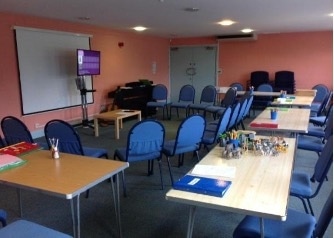
Give yourselves plenty of time to set up the room. Allocate a place or table for each child to go to when they first arrive and, as far as possible, keep this as “their” space.
You might arrange chairs for "Group Time" — I used that layout for a long time but later found that many children preferred to stay at their tables. Choose whichever option best suits your group.
When setting up the tables, I put out work trays, folders, individual named pencil cases, visual timetables, and sensory fidget toys for those who might need them, as well as toys or activities to engage the children on arrival.

🧸 Sensory aids — useful additions for the room
Trampoline — for example this mini fitness trampoline from Amazon.
Pop-up sensory tent — for example this sensory blackout tent for autism from Amazon.
A selection of fidget toys and ear defenders — see Sensory Equipment on Extra resources for ideas.
📋 Visual Timetable
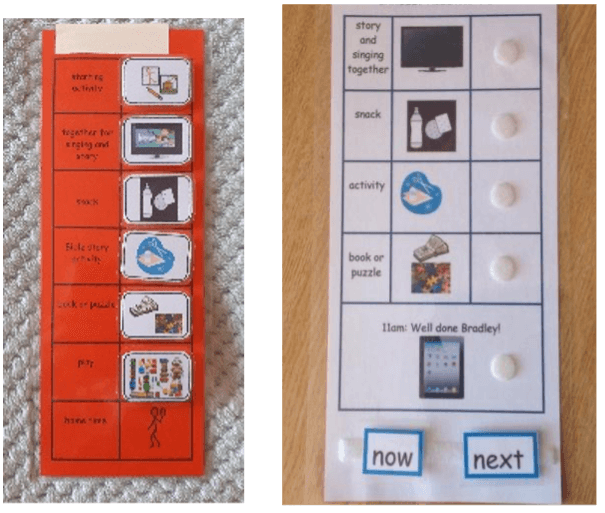
Some children find it useful to have a visual timetable as shown here. Downloads and guidance are on the Visual timetables page.

🙏 Prayer
It is always good to allow 10 minutes for the leaders to pray together before the session starts.
Beginning of Session
⏰ Timings
The timings in the lesson plan are based on our church service, which begins at 10:00am. Parents collect the children at 11:15am or shortly afterwards.
In the “Lesson Bundle” included in each session, there are editable Word documents as well as PDFs, so you can adapt the timings and anything else to suit your own group.
Arrival
In the group I run, children choose an activity when they arrive. They often bring something with them, such as a soft toy, game or tablet. If we know a child has a particular special interest, such as Lego, we make sure it is available and ready for them.
The end of this section is marked by the “Countdown” video of 100 sheep jumping over a fence. When the countdown reaches 20, all personal tablets and phones are collected and put away ready for the teaching time.
Group Time
🤗 Welcome
We begin the session by playing a hello game or singing a welcome song. The game involves throwing a football to another person (child or leader) in the group while saying their name as the ball is thrown. This encourages children to learn and use each other’s names and helps build a sense of belonging within the group. We continue until everyone has had at least one turn. For some children, this can feel challenging, so we encourage and support one another throughout the activity.
An alternative option is for the leader to throw the football to each child in turn, with the child then throwing it back to the leader.
If you prefer to sing a welcome song, you could use this: Hello Song
🎓 Teaching
The Lesson Plan and PowerPoint presentation contain all the information needed to teach the session, so you should be ready to begin with your prepared PowerPoint or USB stick and lesson plan.
The teaching is intentionally kept fairly short to take into account the mixed levels of ability within the group. The use of videos also helps engage children of all levels.
You may prefer to use musicians to play live music rather than using the suggested songs, but the visuals are often helpful for those who are unable—or reluctant—to join in.
I have added prayers to the PowerPoint presentations. These are not included in the Lesson Plans because they would need to be displayed for everyone to join in together. You may also prefer to pray more spontaneously for one another and take a more flexible approach.
The Aslan opening prayer can be downloaded if you are using the videos without a PowerPoint.
🍪 Snack Time
We have a biscuit and a drink of water and use this time to see whether anyone has any news to share. This social time is important and has become easier as the children have grown more comfortable with one another.
When there is a birthday, we always provide a cake and give a card. Not all children enjoy having “Happy Birthday” sung to them, so I always check with the parents or the child themselves first. After a few minutes, we move into the activity section of the morning.
Activity Time
In addition to the directed tasks in the work trays, it is helpful to provide a range of games, puzzles, books, and other activities for children who finish quickly.
📁 Folders
Children may like to take their work home. If not, we also provide an A4 ring binder to file their work in, which is then kept at church, with the option of taking it home at the end of the year.
End of Session
Once activities are finished, we return phones and tablets and allow free-choice play as wind-down time, such as toys, apps, drawing, or building activities.